Playing with CSS3ListThumbs

Playing with CSS3

December 08, 2009

When I was working on the new version of Abduzeedo, the current one, I decided to learn and use CSS 3 to enhance the visual of some elements. Instad of using images to create shadows and round corners I used CSS 3. Of course I knew that it would not be compatible to all browsers, more precisely, the Internet Explorer.

From the statistics of the site, the majority uses Firefox (51.05%), followed by Safari (25.38) and then Internet Explorer with only 11.73, I thought it would work alright, and for those readers that use other browsers they would be able to access the site but would not be able to see these little details.

So for this tutorial I will show you how I created some of the effects you see on the Abduzeedo UI. We will play with Box-Shadow, Round-Corners, Tex-Shadow and CSS gradients. The idea is to practice, in my opinion the best way to learn.

Final Result

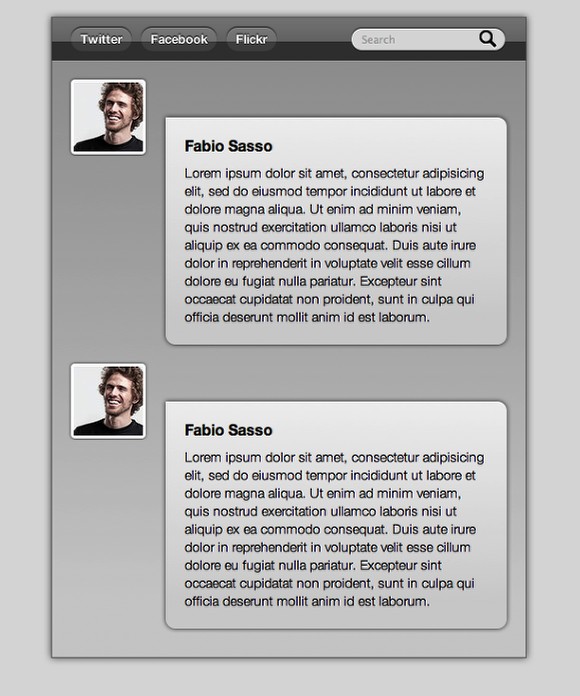
This is the final result we will have by the end of this quick tutorial. The idea is to play a little bit with CSS3 even though this might not work perfectly on IE an Opera.
Playing with CSS3
Click on the Image to see the DEMO - It works only in Safari, Firefox and Chrome

Step 1

The first thing to do is to create the HTML file with our data. Also let's create the link to our CSS file (<link rel="stylesheet" href="tut.css" type="text/css" media="all">). There's great places to learn more about HTML and CSS, I recommend CSS Tricks, Nettuts, Smashingmagazine, W3C, 24ways, Woork and others.

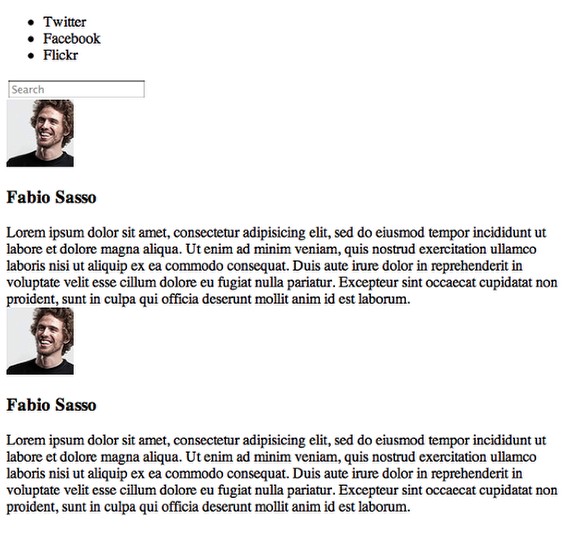
Below you can se the page without any style.
Playing with CSS3

Step 2

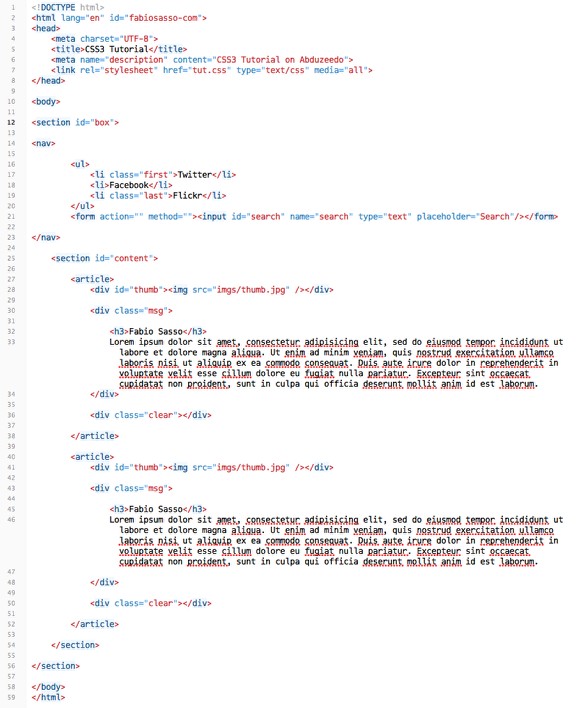
Here's the HTML file, as you can see we're using HTML 5, once again to practice. That's the best thing of personal projects, we can practice and learn.

Basically we have a Section called "Box" where the content will be inside. Then we have the navigation (Nav), another section with the content (content) and then inside the content section we have the messages. We use the tag article to them.
Playing with CSS3

Step 4

Let's start it by changing the "body" style. So let's define the font, the font weight, margins, paddings and the background color. It's really important that you have some CSS knowledge already, especially about the CSS Box Model to understand how Padding, Margins, Border, and sizes work. I highly recommend that you read this great article by Chris Coyer: The CSS Box Model

body{
	font: 14px/140% "Helvetica Neue", Arial, Helvetica, Geneva, sans-serif;
	font-weight: lighter;
	margin: 0;
	padding: 0;
	background: #ddd;
}

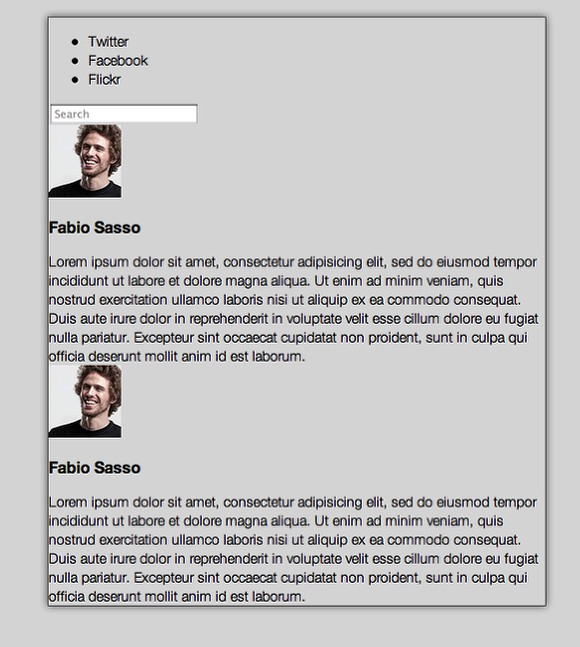
Now for the box we will play with a new CSS 3 property, Box Shadow. Basically we can add shadows to elements without using any image. It's pretty simple to use, you set the Horizonal Lenght, Vertical Lenght, Blur and Color.

Example: box-shadow: horizontal lenght vertical legnth blur color = box-shadow: 0px 0px 10px #666.

For more information about Box-Shadow check out this article: Box-shadow: shadow effect on elements in css3.

#box{
    display: block;
    position: relative;
    width: 500px;
    margin: 20px auto;
    border: 1px solid #666;
    -webkit-box-shadow: 0 0px 10px #666;
    -moz-box-shadow:0 0px 10px #666;
    box-shadow: 0 0px 10px #666;
}
    

Playing with CSS3

Step 5

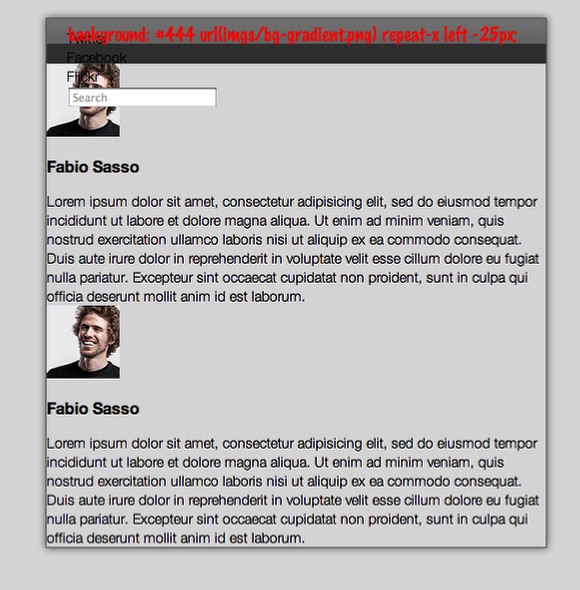
For the navigation I created a PNG image with alpha transparency to use to create bevel effect to the navigation bar.

nav{
    position: relative;
    display: block;
    clear: both;
    background: #444 url(imgs/bg-gradient.png) repeat-x left -25px;
    height: 25px;
    padding: 10px 20px 10px 20px;
}

I highly recommend that you use a RESET.CSS for your projects, but here I'm not using, so I will just reset the UL and LI behaviors in order to create my navigation buttons. To understand why we reset our CSS, read this article by Eric Meyer: CSS Tools: Reset CSS.

nav ul, nav ul li{
    list-style-type: none;
    padding: 0;
    margin: 0;
}

The goal of a reset stylesheet is to reduce browser inconsistencies in things like default line heights, margins and font sizes of headings, and so on.
Playing with CSS3

Step 6

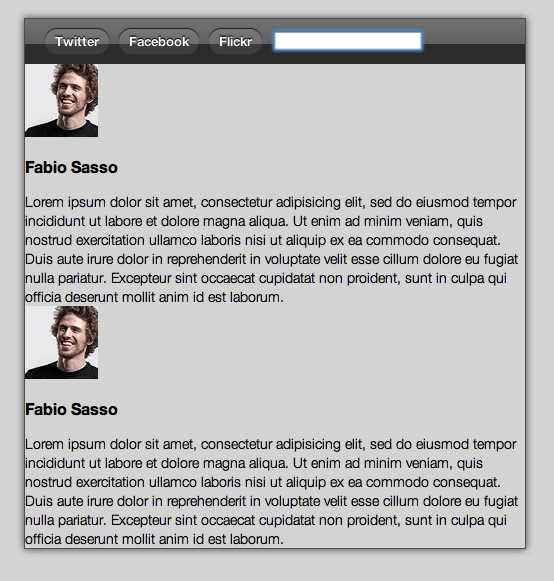
For the buttons we will use round corners, box-shadow and text shadow to create a very nice effect. Take a look at the code below. Text-shadow is pretty much the same as box-shadow but for text, it's the same syntax. Now the round corners is different and it's one of the most wanted effects, we won't need to add a lot of markup and images to create this effect anymore.

I recommend 2 articles about Round Corners: Border-radius: create rounded corners with CSS! and Have a Field Day with HTML5 Forms. The last one will cover another HTML 5 and CSS 3 new features.

nav ul li{
    float: left;
    background: #555 url(imgs/bg-gradient.png) repeat-x left -35px;
    padding: 0 10px;
    margin: 0 10px 0 0 ;
    color: #fff;
    font-weight: bold;
    height: 25px;
    line-height: 25px;
    font-size: 13px;
    cursor: pointer;
    -moz-border-radius: 20px;
    -webkit-border-radius: 20px;
    border-radius: 20px;
    -webkit-box-shadow: 0 -1px 1px #333;
    -moz-box-shadow:0 -1px 1px #333;
    box-shadow:0 1px -1px #333;
    text-shadow: #000000 0 -1px 1px;
}
Playing with CSS3

Step 7

When the user hovers the button we will change the color of the background, font and effects.

nav ul li:hover{
    background-color: #ccc;
    box-shadow: 0 -1px 1px #fff;
    -webkit-box-shadow: 0 -1px 1px #fff;
    -moz-box-shadow: 0 -1px 1px #fff;
    color: #333;
    text-shadow: #fff 0 1px 1px;
}

Playing with CSS3

Step 8

For the search field it's going to be pretty much the same, however we will use another image for the background, the magnifying glass icon, and position it on the right .

input{
    background: #ddd url(imgs/mglass.png) no-repeat 135px 2px ;
    outline: none !important;
    position: absolute;
    right: 20px;
    display: block;
    padding: 5px 10px;
    top: 9px;
    border: none;
    -moz-border-radius: 20px;
    -webkit-border-radius: 20px;
    border-radius: 20px;
    box-shadow: 0 -1px 1px #333;
    -moz-box-shadow: 0 -1px 1px #333;
    -webkit-box-shadow: 0 -1px 1px #333;
}

For the focus state let's just change the color of the backgroun.

input:focus{
    background: #fff;
}

Playing with CSS3

Step 9

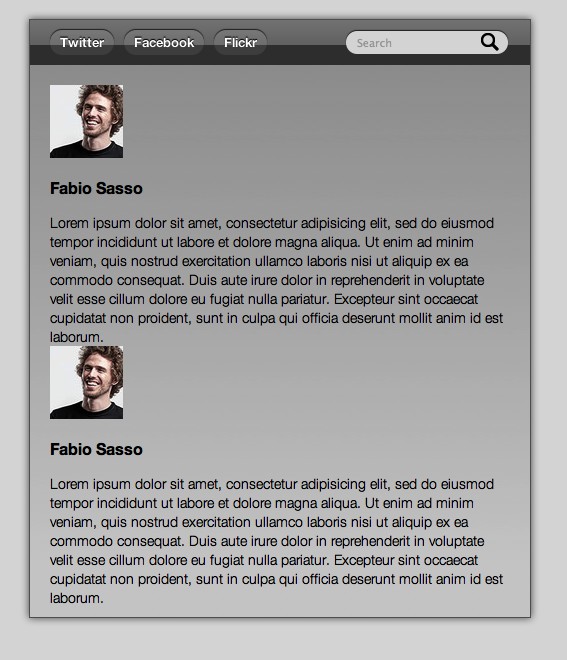
For the content let's play with gradients via CSS3. This will work only on Webkit based browsers. (Safari, Chrome, Webkit). Basically we set 2 or more colors that will create the gradient. I highly recommend that you take a look at this article: Introducing to CSS Gradients. Because only Webkit browsers will show the gradient I added 2 backrounds, the first one is set to grey (#ddd) and it will work on other browsers that will ignore the gradient.

section#content{
    display: block;
    position: relative;    
    background: #ddd;
    background: #ddd -webkit-gradient(linear, 0% 0%, 0% 90%, from(rgba(100, 100, 100, .5)), to(rgba(90, 90, 90, .1)));
    padding: 20px 20px 10px 20px;
}

.clear{
    clear: both;
}
Playing with CSS3

Step 10

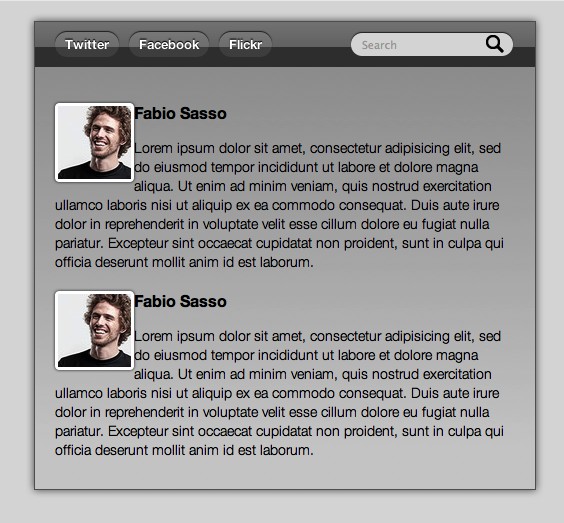
For the thumbnails lets once again use Round Corners and Box Shadow. Besides that, use FLOAT:LEFT to align them to the left and a 3px solid white border.

#thumb img{
    float: left;
    border: 3px solid #fff;
    -moz-border-radius: 4px;
    -webkit-border-radius: 4px;
    border-radius: 4px;
    -webkit-box-shadow: 0 0px 3px #333;
    -moz-box-shadow:0 0px 3px #333;
    box-shadow:0 0px 3px #333;
}
Playing with CSS3

Step 11

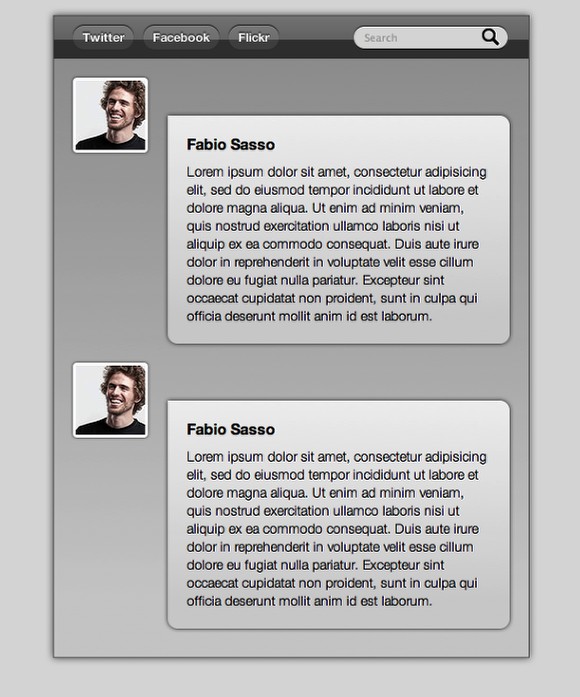
The idea for the messages is to create a dialog box. Apply the Round-corners to all sides but the top left. Also I added the Box Shadow, and the CSS Gradient.

div.msg{
    float: right;
    width: 320px;
    padding: 20px;
    background: #f0f0f0 -webkit-gradient(linear, 0% 0%, 0 90%, from(rgba(100, 100, 100, 0)), to(rgba(90, 90, 90, .2)));
    
    -webkit-box-shadow: 0 0px 5px #333;
    -moz-box-shadow:0 0px 5px #333;
    box-shadow:0 0px 5px #333;
    
    margin-top: 40px;
    
    -moz-border-radius-bottomleft:0px;
    -moz-border-radius-bottomright:10px;
    -moz-border-radius-topleft:0;
    -moz-border-radius-topright:10px;
    
    -webkit-border-top-left-radius: 0px;
    -webkit-border-top-right-radius: 10px;
    -webkit-border-bottom-left-radius: 10px;
    -webkit-border-bottom-right-radius: 10px;
    
}

As I didn't reset my CSS, the H3 was using the browser default style for it. So I had to change the margin to 0 and for the padding I changed the top, right and left to 0 just adding 10 pixels for the padding bottom.

h3{
	     padding: 0 0 10px;
	     margin: 0;
}
Playing with CSS3

Step 12

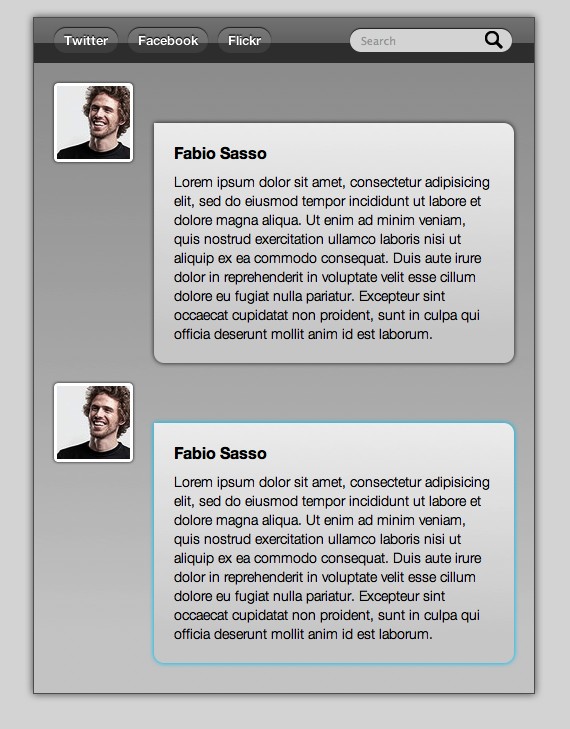
One of the coolest things about CSS 3 is that we can play with shadows and also create glows by just changing the color of the box-shadow.

div.msg:hover, #thumb img:hover{
    -webkit-box-shadow: 0 0px 5px #0cf;
    -moz-box-shadow:0 0px 5px #0cf;
    box-shadow:0 0px 5px #0cf;
}
Playing with CSS3

Conclusion

Once again the idea of this quick tutorial is to show you the possibilities, there's much more to learn and of course everything has to be tested to make sure that it will work fine on different browsers. It is all about practicing.

Playing with CSS3
Click on the Image to see the DEMO - It works only in Safari, Firefox and Chrome
Download the Files used for this Tutorial

Click here to download the files used for this tutorial

About the author

My name is Fabio Sasso, I'm a graphic/web designer from Porto Alegre, Brazil and I'm the founder of Abduzeedo. I hope we can share lots of information, tips, and ideas through Abduzeedo. Also you can follow me on Twitter or my personal site at http://fabiosasso.com.

Sponsored Links:

More content from:

Help us to share this!

43 Comments

Anonymous12/08/2009

I hope css3 will be viewable soon for every browser. Then I will start updating all my sites :)

Thanks for writing this tutorial!

anonimus12/09/2009

That will not happen until general consumers start using browsers that are more standards-compliant and designers/developers stop wasting time writing code to compensate for outdated browsers such as Internet Explorer, while being one of the most used browsers, has contributed practically nothing to the advancement of web technologies or the internet as a whole.

Zoob01/10/2010

You're so wrong. IE was doing AJAX before it was "popular", inline editing was in IE before anyone else even thought about doing it -- and this CSS3 stuff was also in IE, over 8 years ago.

The truth is that everyone is playing catch-up to what IE threw out there years ahead of its time. The downfall IE had is that it didn't bother to track with the "standards compliance" (ahem, webkit-xyz isn't exactly a standards-friendly naming convention).

The other problem IE had was that it decided to heavily rely on ActiveX and become a huge vector for viruses.

Regardless of being non-standards compliance; IEs browser was more capable ten years ago to what we're just catching up to today. It's ActiveX and viruses which caused IEs downfall. As far as a browser goes, it's a darn good one.

And I'm a die-hard Chrome user, btw.

poGDI12/08/2009

Great! :P Started to play around with this myself. Will be so nice when it will be supported for every browser!

Deavy12/08/2009

Exelent! Great tutorial, but lacks multiple background example.

mixn12/08/2009

CSS3 is like ... a relief

Webstandard-Team12/08/2009

Very nice tutorial Fabio! Perhaps you can add a screenshot of Non-CSS3-Supporting-Browsers ;o)

Mike Burroughs12/09/2009

It doesn't look too good in IE 8. I can only imagine how bad it is in IE 6 or 7.

http://i67.photobucket.com/albums/h287/burroughs_688/fabiosassopersonalw...

Chris Savoie12/09/2009

Well, I was curious and wanted to see what it looked like in IE6,7&8 and it was pretty much destroyed. My next step is to take the results from this tut and learn what I need to have it look less exploded in IE

Oliver12/08/2009

First: Great article. I really love the new feature set of html5 and css3. Round corners and shaddows can save you days of work. In fact today the don't do yet, but the future looks promising!
-> Hey Internet Explorer, I am looking at you!

Second: Didn't know that you are using my ".zip box" icon from the flavour iconset on abduzeedo! Now I am proud man! :)

Best regards from Bonn, germany,
Oliver

TheMaker12/08/2009

Very nice effect =)!
I recently posted on my blog, how to create a web 2.0 button with CSS3: http://ri.ms/sdvpa

Athellos12/08/2009

Very nice!!

CSS3 Rocks

Hybrid5912/08/2009

Génial c 'est très utile, je veux plus de tuto comme ça !
----------
http://hybrid-creation.deviantart.com/

CocoaBear12/08/2009

Just what I needed :)

Abhinav12/08/2009

Nice read.. CSS3 with HTML5 support will enhance the web towards the +ve side!

Rihards12/08/2009

Great article, but shouldn't it say "Of course I knew that it wouldn't be compatible to/with all browsers, more precisely, the Internet Explorer."

Since it's well these things aren't compatible with Internet Explorer.

abduzeedo12/08/2009

That's true, my bad... I've just fixed it.

Thanks a lot ;)

Tyrone Michael Avnit12/08/2009

Nice tutorial!

Gabri12/08/2009

the nav ul li text-shadow have a small error

it`s

-webkit-box-shadow: 0 -1px 1px #333;
-moz-box-shadow:0 1px 1px #333;
box-shadow:0 1px 1px #333;

and should be

-webkit-box-shadow: 0 -1px 1px #333;
-moz-box-shadow:0 -1px 1px #333;
box-shadow:0 -1px 1px #333;

to achive the same effect in FF too you forgot to put the (- sign) , it`s not a big deal though .

i used many CSS3 on my site and it`s nice , Great post .

zangetsuBankai12/08/2009

LMFAO damn this is wilde im still learning CSS but damn thats amazing ! i definitely need to learn how use this

Tutos Web.net12/08/2009

Awesome! Great job. Thanks a lot for all high quality posts.

Best Regards,
Luigi Facchinetti - TutosWeb.net - Brazil

MWL12/08/2009

Very useful tips. Thanks.

thepeachdesign12/09/2009

I am a web developer my self, and i believe CSS3 would come in handy in the near future but only if IE is no longer the majority of browser used worldwide (especially the only CSS nightmare, IE6!)

Anyway, great article.

___________________________
http://www.thepeachdesign.com

arnold12/09/2009

more web design tuts please.... because I know abduzeedo is cool at designs.

Im using CSS3 with some of my projects , thanks for this!

Doc12/09/2009

Great stuff!!

Wish we could use CSS3 and HTML 5 without worrying about incompatibility with browsers.

Soon I hope.

Anonymous12/09/2009

I have FireFox 3 myself, yet I don't see any shadow nor gradients...

GrandmasterB12/10/2009

You need Firefox 3.5 to see CSS3 styles

Joseph S.12/09/2009

There seems, to me, to be too much concern over IE supporting this stuff.

It is embellishment. If they don't have support they get no shadows and a square angled box... big deal.

As long as it doesn't impair usability, it's just removing flair.

http://dowebsitesneedtolookexactlythesameineverybrowser.com/

GrandmasterB12/09/2009

Great Tutorial! I noticed what may be an error in the css in step 11.

div.msg{

-moz-border-radius-bottomleft:0px;
-moz-border-radius-bottomright:10px;
-moz-border-radius-topleft:0;
-moz-border-radius-topright:10px;

-webkit-border-top-left-radius: 0px;
-webkit-border-top-right-radius: 10px;
-webkit-border-bottom-left-radius: 10px;
-webkit-border-bottom-right-radius: 10px;

}

The -moz-border-radius-bottomleft should be 10px and not 0px. Just wanted to give you a heads up.

Once again great tutorial, I'm starting a personal project and will definitely be utilizing some CSS3 and HTML5.

The Wolf12/09/2009

I can't wait till this is standard! And forget IE, it sucks for so many reasons. We just design our sites to look good in IE of course, but the people that use other compliant browsers will get the full experience.

Check this site out for a list and tutorials for CSS3's new features.

http://www.css3.info/

Michael Lynch12/11/2009

CSS3 is awesome. Rounded corners and shadows make things a lot easier on a designer/developer.

mike@tutsking12/11/2009

Great one!

I wouldn't be too concerned about what it looks like in ie, and if you are, then you know the drill. ;)

Anonymous12/12/2009

abduzeedo please create tutorial how to create fire girl like this

http://abstract.desktopnexus.com/wallpaper/53419/

thanks in advance.

Martin LeBlanc12/13/2009

CSS3 is so effective. Great tutorial!

Anonymous12/13/2009

Great tutorial!
I want to see more tutorials like this!

Anonymous12/14/2009

Thanks for info.. It's awsome..

Deepu Balan12/14/2009

Really interesting tutorial. CSS+HTML5 surely is going to rock the cyber world, Eagerly waiting to see IE's take on this...

-Deepu

Collin12/15/2009

Don't you just love IE, lol.
Someone do us all a favor and blow it up.

Owzzz12/15/2009

Just started using css 3 myself... Loving the time saving effects, Great tutorial :)

Bea01/07/2010

I just don't get it, who uses IE6 nowadays?

Thanks for the tutorial! Could you pretty please do more? With sprinkles and whip cream and cherries on top?

uggone01/14/2010

[url=http://www.uggone.com/ugg-adirondack-boot-ii-ugg-boots-5469.html]UGG Adirondack Boot II[/url] | [url=http://www.uggone.com/ugg-adirondack-tall-ugg-boots-5498.html]UGG Adirondack Tall[/url] |[url=http://www.uggone.com/authentic-ugg-adirondack-tall-boots-5498-in-chestnut.html]UGG Adirondack Tall Boots In Chestnut[/url] | [url=http://www.uggone.com/authentic-ugg-adirondack-tall-boots-5498-in-chocolate.html]UGG Adirondack Tall Boots In Chocolate[/url]|[url=http://www.uggone.com/authentic-ugg-adirondack-boot-ii-5469-in-chocolate.html]UGG Adirondack Boot II In Chocolate[/url] |[url=http://www.uggone.com/authentic-ugg-adirondack-boot-ii-5469-in-chestnut.html]UGG Adirondack Boot II In Chestnut[/url]

Daniel Lopes02/12/2010

Very nice. You could use input type="search" to get rounded corners http://dev.w3.org/html5/markup/input.search.html :)

Jure02/12/2010

Ahh, I just love those quick rounded corners with css3.

Post new comment

The content of this field is kept private and will not be shown publicly.