Photoshop Tutorial: Michael Jackson WallpaperListThumbs

Photoshop Tutorial: Michael Jackson Wallpaper
Last week we lost Michael Jackson, a true legend and without any doubt, an inspiration to a whole generation. I grew up listening to his songs and of course, was amazed by his movie clips and dance moves. The moonwalk was something I always wanted to learn how to do and even today, it still impresses me. Also the light effects were always part of the Michael Jackson's repertoire and of course, have influenced a lot in my style.
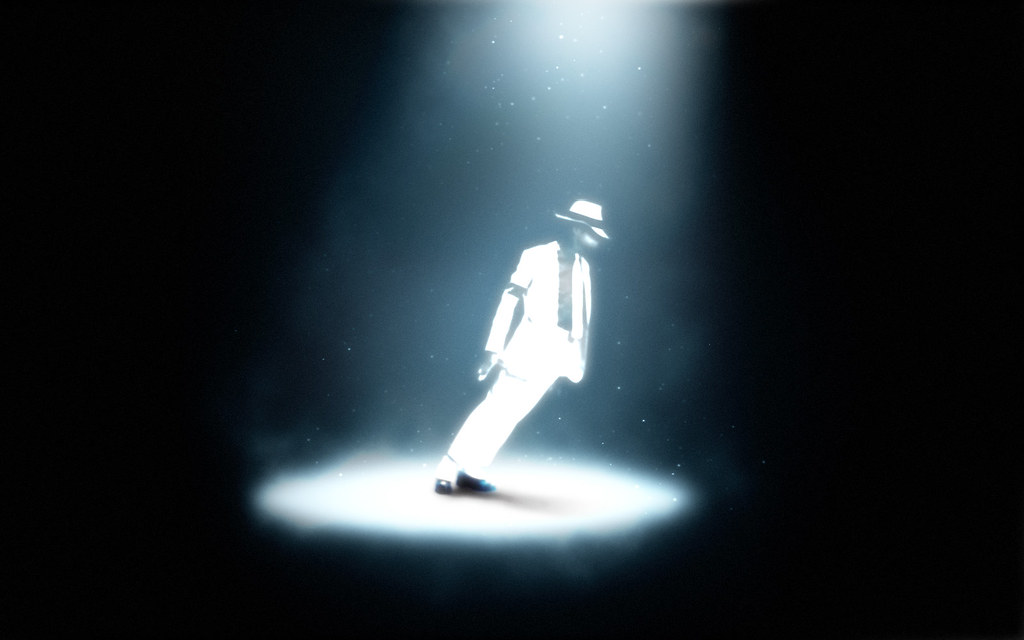
In this tutorial I will show you how I created the wallpaper in tribute to the king of pop.
Step 1
Open Photoshop and create a new document, for the canvas size I used 1920x1200 pixels.

Step 2
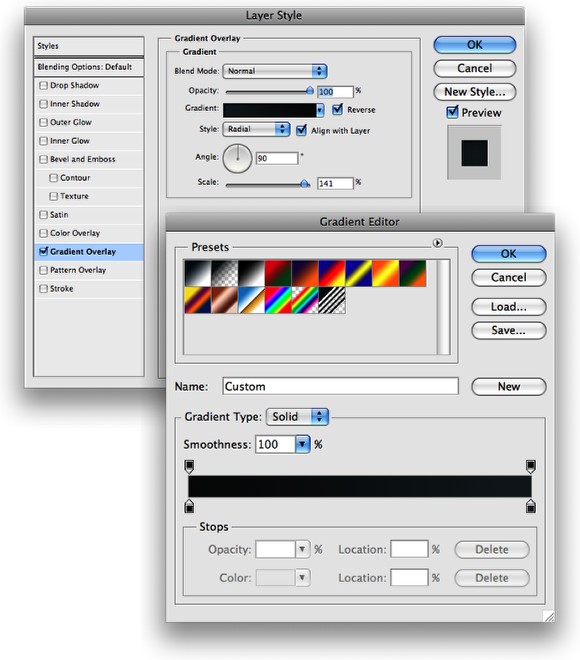
Apply a Layer Style to the background layer, use Gradient Overlay. Use Radial for the Style and for the Colors use #101213 and #253239 for the colors. Also increase the Scale to 141%.
Step 3
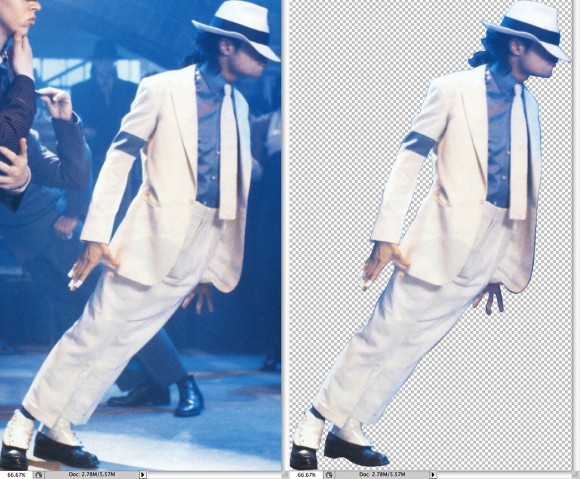
Let's use an image of the King of Pop... I got this one from the http://www.mjjpictures.com/main.html it's the famous leaning move. With the Pen Tool (P) or Polygonal Lasso Tool (L) extract MJ from the background.
Step 4
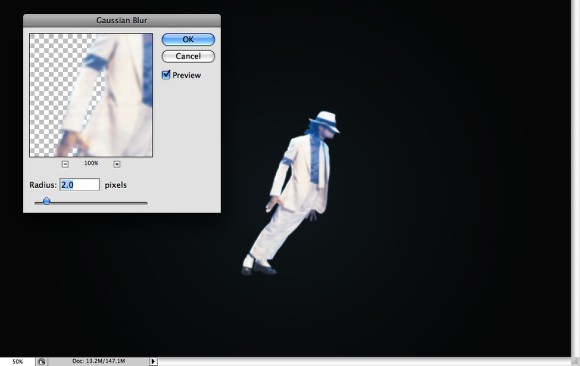
Position MJ in the center of the document and then go to Filter>Blur>Gaussian Blur. Use 2.0 for the Radius.
Step 5
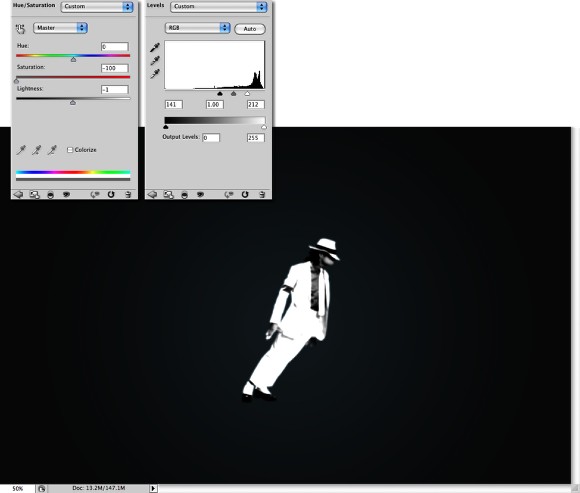
Now go to Image>Adjustments>Hue and Saturation. Reduce the Saturation to -100. After that go to Image>Adjustments>Levels. Increase the Black Input to 140 e the white to 212.
Step 6
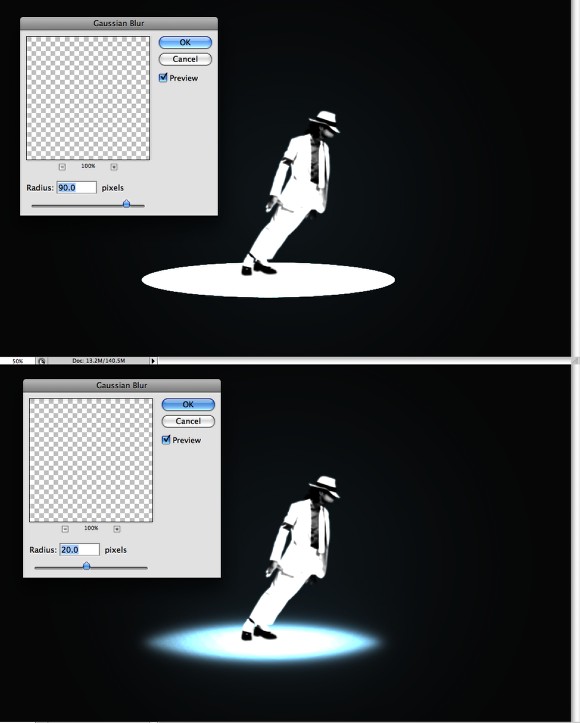
With the Ellipse Tool (U) create an ellipse like the image below, then go to Filter>Blur>Gaussian Blur. Use 90 pixels for the Radius. Create another ellipse and repeat the Gaussian Blur, this time however, use 20 pixels for the Radius. Group these 2 ellipses and then change the Blend Mode of the group to Color Dodge.
Step 7
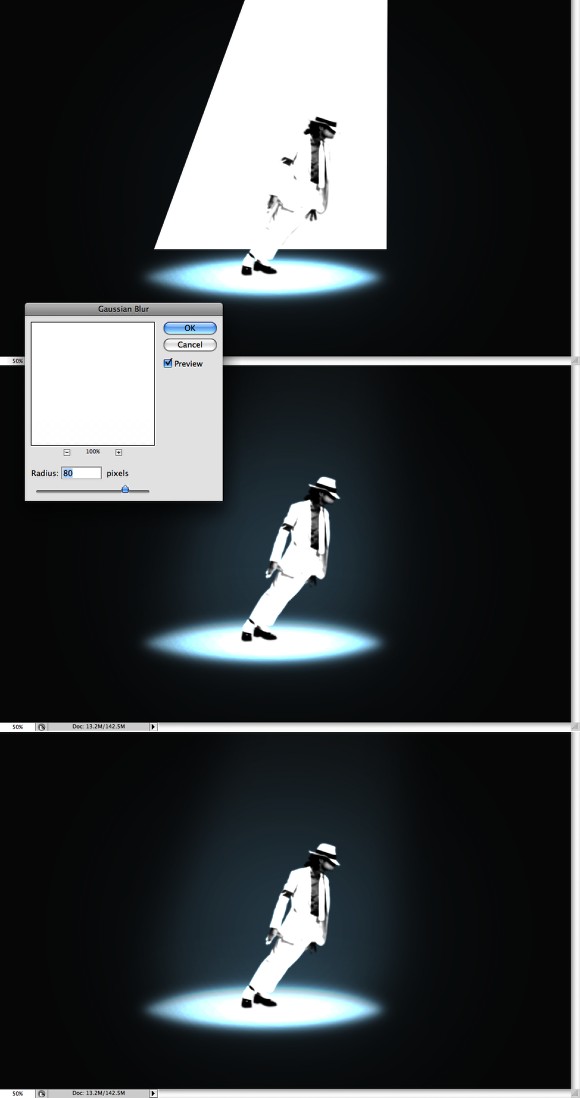
With the Pen Tool (P) create the spot light, then go to Filter>Blur>Gaussian Blur. Use 80 pixels for the Radius. Change the Blend Mode to Overlay than duplicate this layer 2 times. You will have 3 layers.
Step 8
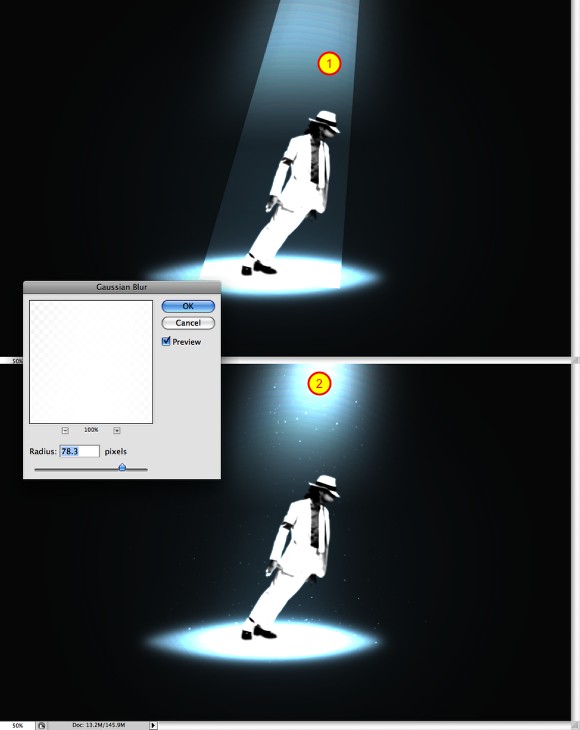
With the Pen Tool (P) create another triangle like the image below just to make the light brighter towards the top and middle. Go to Filter>Blur>Gaussian Blur. Use 80 pixels for the radius. Also add another layer and then with the Brush Tool (B), use a big round brush with white for the color. Paint a spot of light at the top. After that group these 2 layers and change the Blend Mode of the group to Color Dodge.
The last thing here is to add some sparks. I've written quite a few tutorials explaining how to do that you can check this out: http://abduzeedo.com/amazing-photoshop-light-effect-10-steps
Add another layer inside the group with Color Dodge and then paint some sparks like the image below.
Step 9
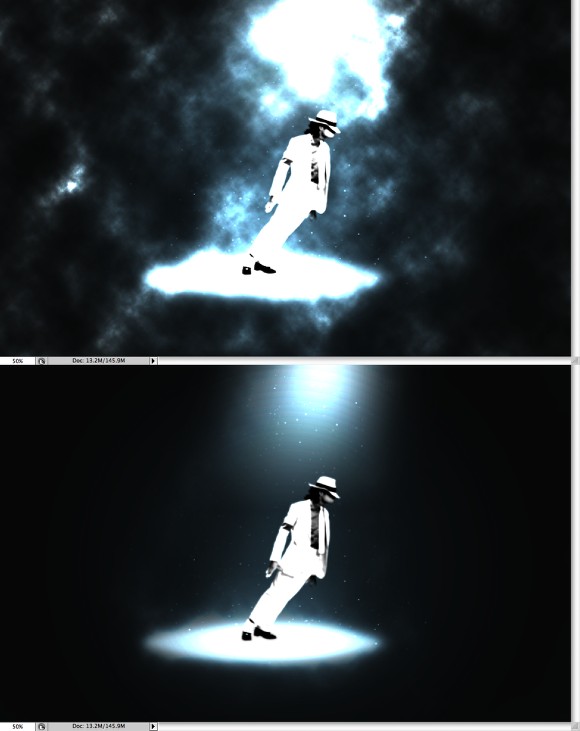
Add another layer on top of the others and go to Filter>Render>Clouds. Make sure you had black and white for the background and foreground colors. Then change the Blend Mode to Color Dodge. After that with the Eraser Tool (E) select a big soft brush and start deleting the layer, leave just some very small areas close to the lights.
Step 10
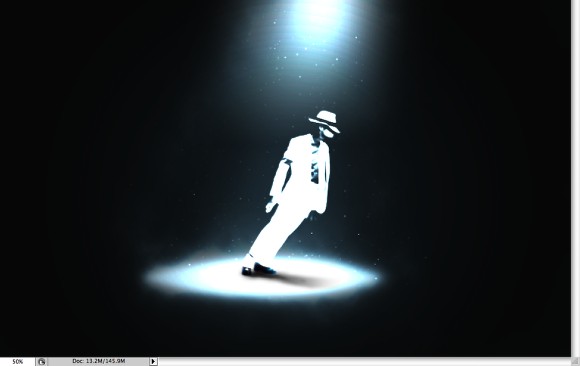
Select the MJ layer and change the Blend Mode to Color Dodge. Then with the Pen Tool (P) create a black triange to use as the MJ shadow. Then with the Eraser Tool (E) delete the end with a very soft brush. Also you will have to duplicate the MJ layer and change the Blend Mode to Normal then delete the rest of the layer and just leave the feet. We have to that because with the Color Dodge Blend Mode the black becomes transparent so MJ's shoes wouldn't appear.
Conclusion
Select all layers and duplicate them, then go to Layer>Merge Layers. After that go to Filter>Blur>Gaussian Blur. Use 15 pixels for the Radius and change then Blend Mode to Screen. That's it, our little tribute to the King of Pop, full of light effects and magic like his music. Now it's all about playing with the tool and creating your own version! Cheers ;)
Download the PSD file
Click here to Download the Photoshop file used for this tutorial.


45 Comments
Nice work, simple and nice.. Thanks.
great tutorial. thanks for sharing! take a look at this collection of 20 artisitc drawings, paintings and pictures of Michael Jackson too - http://www.weblog.pxforce.com/2009/06/20-artisitc-drawings-paintings-and...
Cool tutorial!
Bit too much MJ stuff going on at the minute, but the techniques used for this wallpaper are ace.
this is totally awesome, my new desktop-shrine for the king :)
Good effects..MJ R.I.P
it show...........................nice:
http://www.flickr.com/photos/eggchandrika/3670984389/
Was wondering when you'd release a tutorial. Shall certainly have a go at this.
nice tutorial! these pictures are good to use! http://tinyurl.com/fanreactionpics
Heres another awesome MJ wallpaper:
http://www.fanpop.com/spots/michael-jackson/links/6875339
here's mine check it out http://rest05.deviantart.com/art/Michael-Jackson-Moonwalk-127377573
dig it
thanks for your work
nice lesson
Hi!
It still needs a bit of work, but it looks pretty sweet so far. You cant see all the blemishes though :P. Still not decided if were going to be buying a new case or not, but if not, I still want something decent looking! Ill have to cut some fan holes, and I plan
wow nice and easy to understand tut.... i really like it tis is wat i did kinda similar but a bit diffrent....... RIP MJ
http://i434.photobucket.com/albums/qq70/dashbod/artwork/MJtibutewallpape...
When he was alive everybody said he was freak, crazy, esquizofrenic, pedo and so on. After his death he is claimed like a God. So hipocritic that thing. At all nice tut.
Not everyone was like that. I'm a fan of MJ since the 80's and never believed anything the media said about the King. Everyone of us has his demons to face in this life. His demons were the media and the paparazzi. But I admit that people changed after his death.
About the tutorial: This picture is my wallpaper since months now. I found it on a website for MJ wallpapers. Didn't know it was from this website. Great tutorial and great effects. I felt in love with it since the moment I saw it. Simple yet stylish. R.I.P. MJ.
nice work - few months back i wanted to create a similar wallpaper with a guitarist, and never got the right spotlight, and this is perfect.
ps, RIP to the legendary Michael
I love your blog!
I love MJ.
Thank you for the tutorial.
This picture is so stunning...
And i agree with you 100%, DanLamotta. Not only is his death upsetting, but the multitudes of hipocrites crawling out from under the woodwork makes me want to punch something.
night cool.................................ho,ho,ho,ho.................:
http://www.flickr.com/photos/eggchandrika/3674752786/
LOVE YOU MICHAEL JACKSON.
Simply...... Wonderfull !!!!!!!!!
You can make Michael Jackson IPhone wallpaper with your own text here: http://mytextiphone.com
another famous pose
http://i960.photobucket.com/albums/ae85/YGandM/mj2.jpg
Fantastic stuff! Thank you! Rest in Peace mikey!
You shall always remain within our hearts. we grew up with you within our mind as our star and king of pop music. never in the history of this world has ocurred and never will happen a personality to gain such a fan popularity. We love you Michael.............. Amitav and Biswajit. Thanks to Your site
Great tutorial but PSD Source file is not the same
!
Please can you upload the right file :)
Repellent work! Thank you!
You got a coffee from me :P
Absolutely brilliant! Thanks for posting
Here's my first attempt, of making an MJ wallpaper :
http://img268.imageshack.us/img268/3658/mjwallpaper.png
Give me some feedback!
sorry for my bad english - Im only 15.. :=)
Thanks for the tut.
here is my design
http://matty2fresh.deviantart.com/art/Do-you-Remember-127728331
Sem palavras meu caro. Uma bela e profunda homenagem. Com certeza foi bem recebida por ele. Trabalho super profissional. Michael forever in your heart!
it would be a lot useful to me three days ago. shame on me. the result is brilliant. awesome work guys.
awesome tutorial and very creative. Crelle it was pretty good, the stars must go
Interesante este tutorial te agradeco por hacerlo público, gracias mil
great tut !!!
featured here
http://akujirocks.deviantart.com/art/rockstar-128567094
Nice tuts
I just made pictures for Jacko also, he is the king of pop music for me!
Check out the photos from my flickr photostream.
There 3 types of picture ; colorful, black&color, black&white
http://www.flickr.com/photos/32547955@N03/
we wont forget you jacko :(
LOVE IT MJ RIP
really nice tut!
you can also find MJ brushes from here http://scarletbits.com/2009/free-michael-jackson-cliparts/
Hey where can i find the picture you used in step 3?
Very cool thanks
You can check this one too http://www.flickr.com/photos/p-one/3685896433/
This is a special tutorial. Thanx a lot, zee....
woooooooooooow
amazing
But it is difficult when the application is high
And the most difficult step 7&8
i love my best singer the king of king
amme tuuu fotoo de mikee(L
Post new comment